Not Just Connections - EasyARXML Now Shows What's Inside Your ARXML

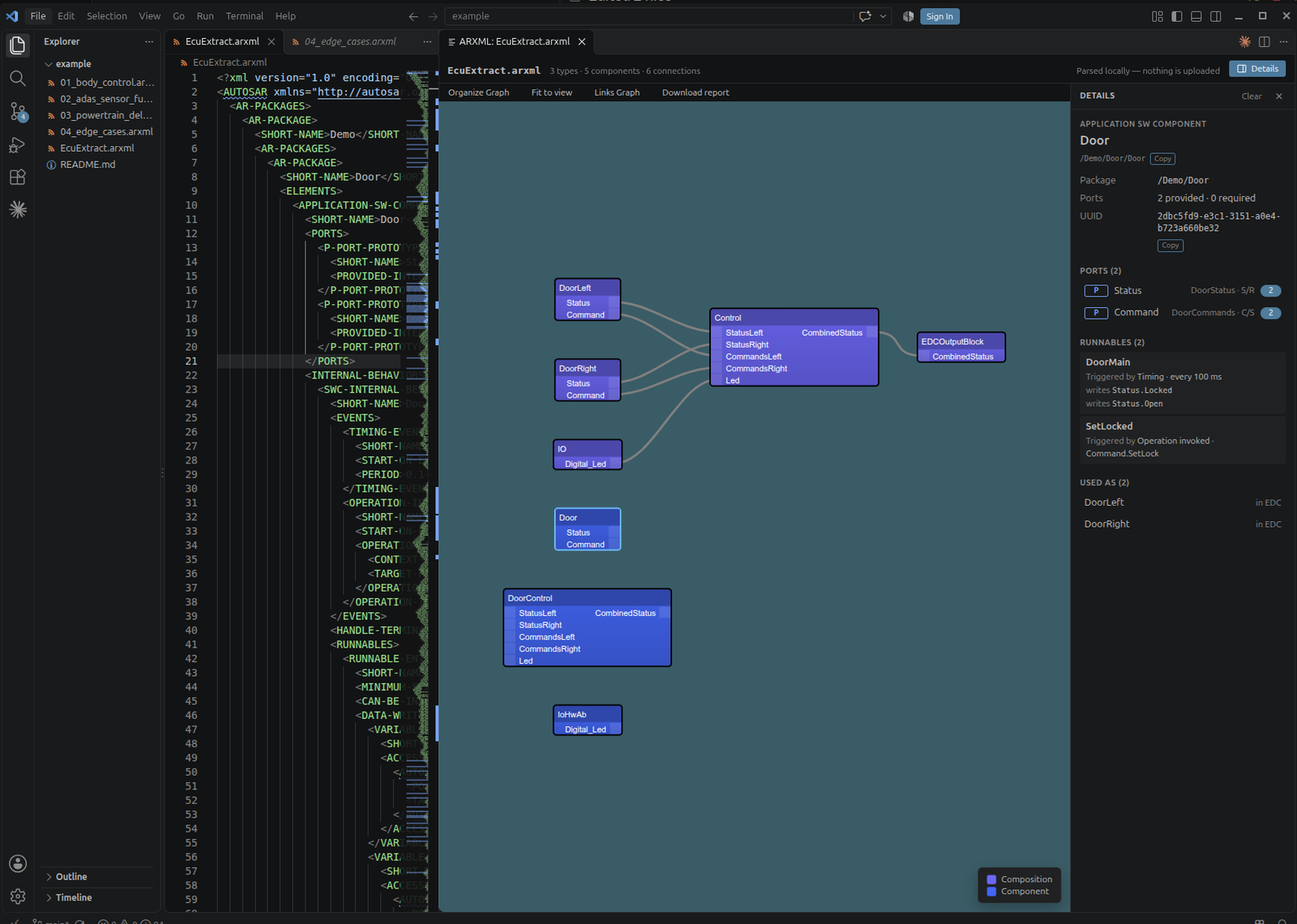 The XML, the architecture, and now the details behind every block — in one window, with nothing uploaded.
When I first wrote about EasyARXML, the argument was that you shouldn't need an expensive tool licence just to look at an AUTOSAR file someone sent you. Then I rebuilt it to parse entirely in the browser, so the file never leaves your machine.
Welcome to MBSE Explained. Both of those were about getting access to the picture. The picture itself, though, only ever answered one question: what talks to what. Blocks, ports, and the connectors between them.
That's the right question when you open a file cold. It is almost never the question you have thirty seconds later. By then you're pointing at a block asking something more specific — what kind of component is this? What's actually on that port, a Sender-Receiver interface or a Client-Server one with operations? What runs inside it, and how often? Where else is this type used?
Answering any of those meant going back to the XML and resolving path references by hand. So that's what changed. EasyARXML now shows you what's inside the architecture, not just the lines between the boxes — and it does it where the file already is.
If you'd rather watch than read, here's the short version:
Click a Block, See What It Actually Is
Select any component in the diagram and a panel opens beside it with:
- What it is — its kind, AUTOSAR path, package and UUID
- Its ports — each one with its interface and interface kind (Sender-Receiver, Client-Server), and how many connections it has
- Its runnables — with what triggers each one (Timing · every 100 ms, Operation invoked · Command.SetLock) and which port data it reads or writes
- Where it's used — for a component type, the places it appears
That last one is quietly useful. "Is this type instantiated anywhere else, and where?" is a question that normally costs you a project-wide search through XML.
Click a Port, Follow the Contract
Ports get the other half of the picture:
- The interface contract — its data elements, or for Client-Server, its operations with their arguments and possible errors
- Every connection on that port — assembly or delegation — and you can click a connection to jump straight to the port on the other end
- The runnables that use it
That jump is the one I use most. Following a delegation connector by hand means resolving a path reference, scrolling somewhere else entirely, and hoping you kept your place in a file that's thousands of lines long. Now it's a click.
Paths and UUIDs copy to the clipboard with a button, because you're usually about to paste one into a requirements tool or a ticket. The selection survives while you edit the file, clears when you switch to another, and Esc clears it manually.
And It Runs in VS Code
The second change: EasyARXML is now a VS Code extension, so none of the above requires leaving your editor.
Open any .arxml, run EasyARXML: Open ARXML Preview to the Side from the Command Palette — or click the graph icon in the editor title bar, or right-click the file in the Explorer — and the diagram opens beside the XML. Your cursor stays where it was.
A few things make it usable rather than just a demo:
- It follows the active editor. Click a different
.arxmltab and the diagram switches with it. No re-importing. - It re-renders while you type. Edit the XML and the diagram updates live. (There's an
easyarxml.liveUpdatesetting if you'd rather it didn't.) - Fit to view and auto-arrange — the whole architecture on screen in one click. Fit to view deliberately never zooms in past 100%, so a two-component file doesn't fill your screen with giant blocks.
- It follows your VS Code theme, light or dark.
- No setup — no configuration, no account, no toolchain.
Still Nothing Leaves Your Machine
This hasn't changed, and in automotive it's the part that matters most.
The extension reads the file from the open document inside your editor and parses it there. No server, no upload, no account, no telemetry on file contents. It works with your network cable unplugged — which is the easiest possible test, and I'd encourage you to run exactly that one.
You also don't have to take my word for it any more: the extension is MIT licensed, so you or your security team can read precisely what it does before it goes anywhere near a machine with customer ARXML on it.
What It Understands
Classic AUTOSAR 4.x (the r4.0 schema): application, service and composition software component types as blocks, their P-Ports and R-Ports on those blocks, and both assembly and delegation connectors as the lines between them. Plus, now, the internal behaviour underneath — runnables, their triggering events, and their data access.
It's still a viewer, deliberately. It doesn't edit your ARXML, and it won't replace your configuration tool for the work that genuinely needs one. It removes that tool from the much larger number of moments when all you needed was to look something up.
Getting It
- VS Code — EasyARXML on the Marketplace, or search
EasyARXMLin the Extensions panel - Browser — easyarxml.com still works exactly as before, for when someone emails you a file and you just want to glance at it without installing anything
If you work with ARXML daily, get the extension. The browser version is for everyone else who receives one occasionally.
That's the mission here at MBSE Explained — simplifying systems for smarter EVs. If you try it, tell me what the details panel is still missing. That list is where the next version comes from.